
From mid-January 2026, the Bromcom Support Desk will begin rolling out a new authentication process.
Who this applies to.
This process applies to customers who:
- Receive support directly from Bromcom
- Call 0208 290 7177 to access our Support Desk service.
How the Authentication Process Works
- Unique User PIN
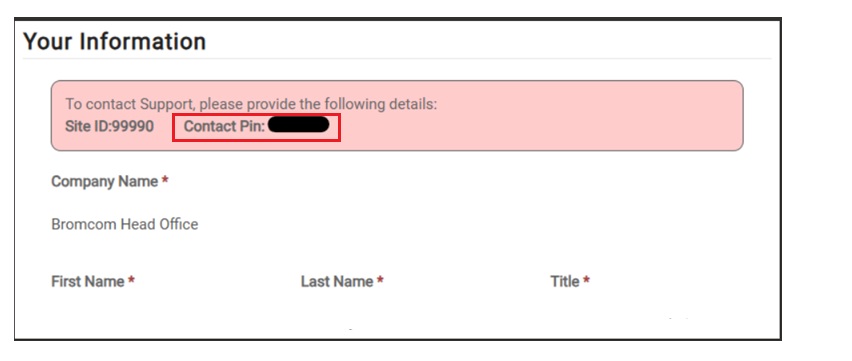
- Every authorised support contact will be assigned a unique 6-digit user PIN code (unique within your site).
- This Contact Pin is visible within the Support Portal under the Profile section.
2. Calling the Support Desk
Trust Contacts: Trust contacts must verify using their main trust site id and they will then be able to seek assistance about any site linked to their multi academy trust. Trust Contacts cannot use a child site id to verify their identity using this computerised process.
When you call the Support Desk, you will be prompted to:
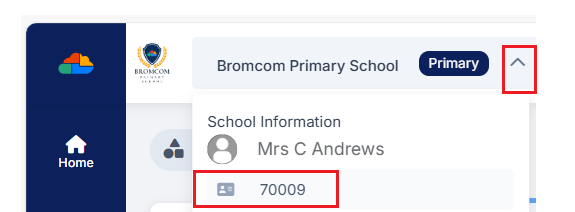
- Enter your 5-digit Site ID followed by #
- Your Site ID can be found within the MIS by clicking on your school name in the top-left corner.
- Enter your unique 6-digit user PIN, followed by #
3. Verification
The security codes are used to verify your identity via a computerised authentication process.
- If verification is successful, you will be transferred to a human agent for assistance.
- If verification is unsuccessful, you will still be transferred to a human agent, who will carry out a full identity check using:
- Site ID
- Username
- Password
4. Initial Transition Period
- A full back verification check will remain in place until the end of February 2026, while customers become familiar with the new process.
Benefits of the New Process
The new authentication process is more secure and quicker because:
- Each support contact has their own individual PIN
- The process does not rely on voice recognition
- Callers can enter security codes directly using their handset
Rollout and Notifications
- The new authentication process will be rolled out in stages
- It forms part of an ongoing project to streamline Helpdesk processes, allowing the Support Desk to scale more effectively to meet customer needs
- Customers will be notified individually shortly before the new authentication process is enabled for their site
Further Information and Support
- For more information on accessing the Support Portal, please see this Help Centre article: Bromcom Support Desk Guide
- If you are having difficulty accessing your user PIN, or would like to provide feedback on the new process, please email: mypin@bromcom.com