
This guide will explain why Students show On Roll and In Pre Admissions at the same time.
This can be caused by a few factors such as Duplicate Student Records and Filtering of the Student List.
See Also: How to Resolve Duplicate Students
Duplicate Student Records
Duplicate Student records can occur due to several reasons, often linked to data entry or system processes. Here are some common scenarios:
- Manual Entry Errors – If a student is added manually without checking for existing records, duplication can happen, especially if slight variations exist in names or details.
- Importing Data – When student data is imported from external sources (such as admissions systems), mismatches in identifiers can lead to duplicate entries.
- Pre-admission vs. Active Enrollment – If a student is first entered as a pre-admission and later added again as an active student without linking the records, duplication may occur.
To check if a Student is a duplicate you can compare both records using the StudentID which is found at the end of the URL. If the ID is the same in both records then it is the same record.
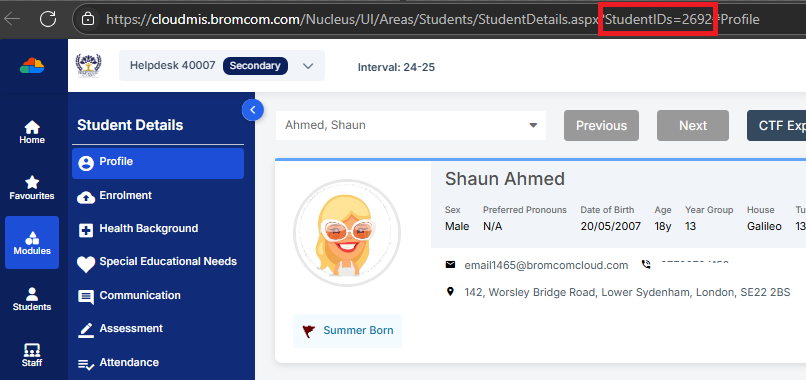
IMPORTANT: A common misconception in schools is assuming that a Student record appearing in both On Roll and Pre Admission status is a duplicate. In reality, this often indicates that the Student has transitioned from Pre-Admission status to active Enrollment, with both records serving distinct purposes within Bromcom. Misinterpreting this can lead to unnecessary data adjustments made by schools, so it’s important NOT TO DELETE the record and instead to verify the context before taking action.
If needing to remove a duplicate record, then we would recommend you to follow our guide on How to Resolve Duplicate Students.
Filtering of the Student List

When on the Student List and clicking Search Filters this will present filtering options for the page. Here you will be displayed with options including the Active Date Filter tick box. Unticking the Active Date Filter on any Status in here will show you ALL memberships that have ever existed in Bromcom for that Status. For example, if you are on Pre Admission Status and you Untick the Active Date Filter box, the system will show you every Student that has ever been a Pre-Admission Student. This means you’ll correctly see a broader list, including Students who may have left, future admissions, or those with historical records.
If you still believe you have an issue with the Student records then please log a Support call with us on your Support Portal so we can check and amend the records accordingly. Please see our guide on How to Raise a Support Call for this.